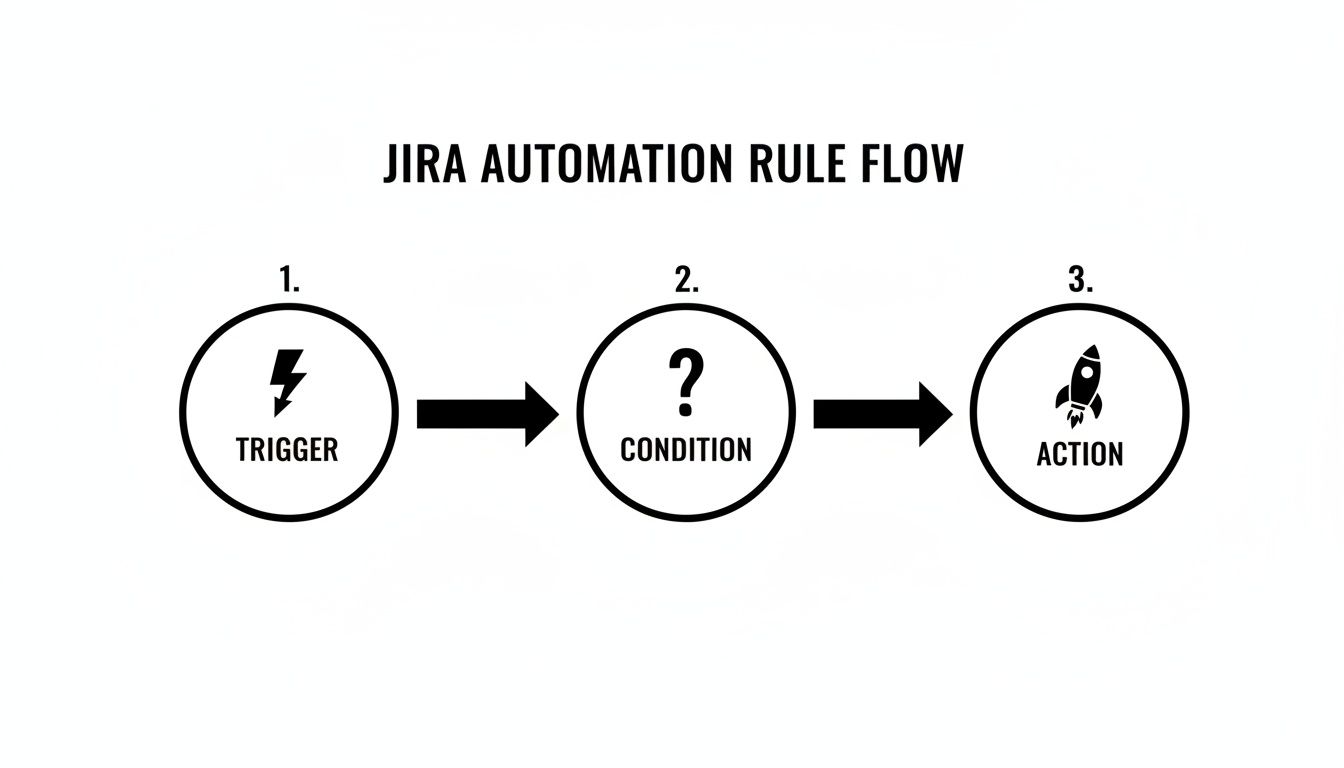
Tag: devops automation

  • A Practical Guide to Release Management With Jira

    A Practical Guide to Release Management With Jira

    To master release management in Jira, you need to think beyond tracking tasks. The goal is to transform Jira into a command center for your entire deployment pipeline, creating a single source of truth that governs planning, execution, and monitoring.

    This guide will show you how to move past Jira’s native 'versions' feature and build a repeatable framework that reflects how your team actually delivers software.

    Moving Beyond Basic Jira Release Tracking

    Jira is excellent for managing individual issues. But for orchestrating a full software release, its out-of-the-box features can be limiting.

    Too many teams juggle spreadsheets, chase manual updates in Slack, and sit through marathon status meetings just to understand a release's status. This scattered approach leads to missed deadlines, miscommunications, and last-minute scrambles.

    This guide provides an actionable blueprint to cut through that chaos. We will walk through how to build a structured, centralized system using a single, dynamic Jira ticket as the command center for an entire release. This approach gives everyone one clear place to look from planning all the way through to production.

    The Problem with Native Jira Versioning

    Relying solely on Jira’s native features for large-scale releases often leads to major delays. Teams who stick to the built-in versioning can see their release dates slip in up to 70% of their cycles. Why? Because scope is often just a manual count of issues, completely ignoring cross-project dependencies and the varying complexity of the work.

    This limited view can inflate coordination overhead by 40-50% as release managers are forced to hunt down updates project by project. As IKU Team’s detailed release management analysis points out, this operational drag is precisely why a more structured approach is so critical.

    Actionable Insight: Treat your release as more than a collection of 'done' tickets. It's a carefully coordinated sequence of deployments, quality checks, and approvals. The first step toward a predictable pipeline is to model this sequence directly inside a single Jira ticket.

    Why a Centralized Release Ticket Works

    Shifting your process to revolve around a single "release ticket" immediately solves the problems that basic version tracking creates.

    Here’s the actionable value you gain:

    • A True Single Source of Truth: All critical information—checklists, dependencies, approvals, deployment logs—lives in one place. Stop digging through different projects or Confluence spaces.
    • Clear Visibility for Everyone: Any stakeholder, from an engineer to an executive, can open one ticket and instantly understand the release status, see what's blocking progress, and know what’s coming next.
    • Built-in Process Compliance: By building your workflow directly into the ticket with checklists and automated gates, you ensure steps aren't skipped. The process itself becomes the guide.
    • Effortless Auditability: The ticket's history automatically becomes a complete, time-stamped log of the entire release, making post-mortems and compliance reviews simple.

    For a deeper look at the foundational concepts behind this, you can explore resources on comprehensive release management. This strategy isn't about replacing Jira, but about elevating it to handle the multi-stage reality of modern software delivery.

    Designing Your Repeatable Release Workflow in Jira

    A solid release process isn’t about more meetings or more spreadsheets. It’s about building a clear, repeatable workflow that everyone understands and follows, right inside the tools you already use every day. The goal is to replace chaotic, last-minute scrambles with a predictable system within Jira.

    The most effective way to achieve this is to map your entire deployment pipeline—from code commit to production push—inside a single, centralized Jira ticket. This ticket evolves from a simple tracker into a living, self-managing vehicle for the entire release.

    You’ve probably seen the progression yourself. Teams start with scattered spreadsheets and endless status meetings, eventually realizing they need a single source of truth. That’s where the central ticket comes in.
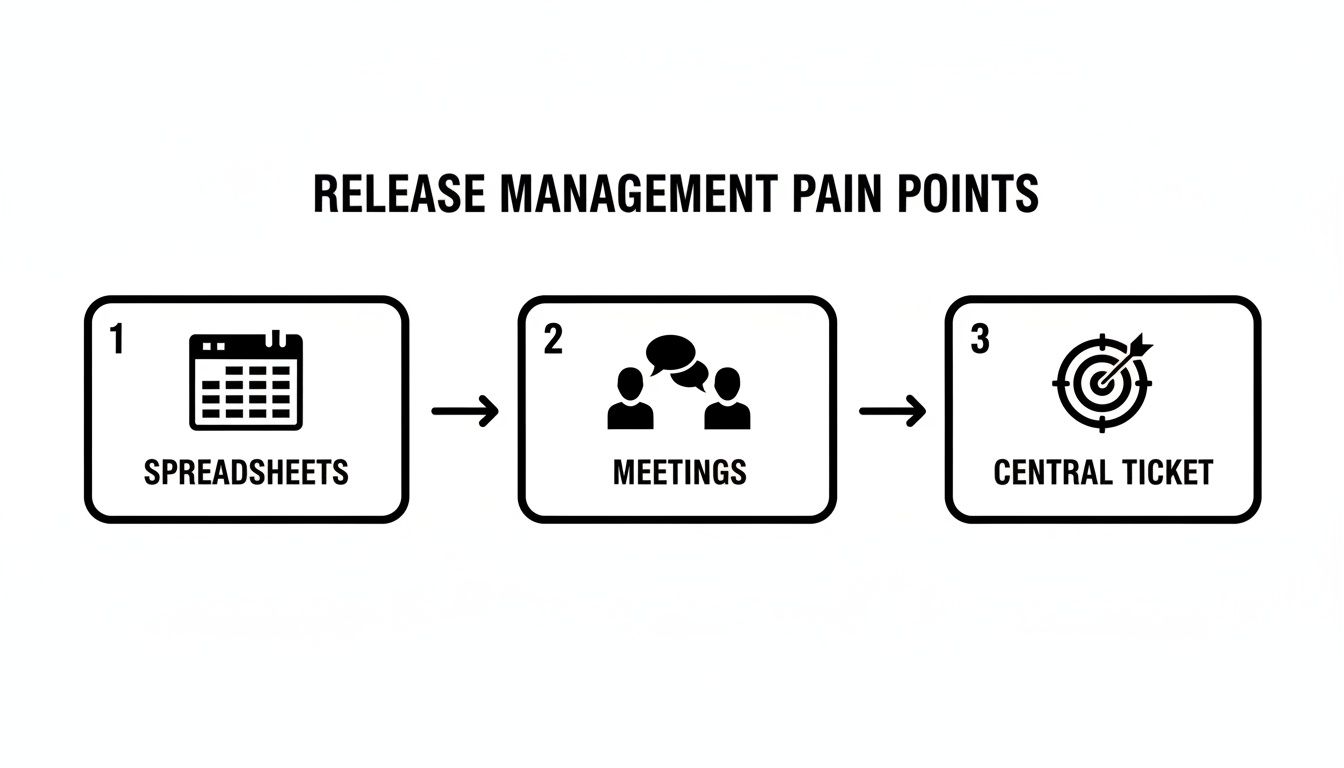
    Diagram illustrating three common release management pain points: spreadsheets, meetings, and central tickets.

    This journey from manual chaos to streamlined control is where the magic happens. A single, well-structured ticket replaces all those fragmented communication channels and becomes the undisputed hub for everything related to the release.

    Structuring Your Release with Phases

    First, break down your release into logical, sequential phases. Instead of a giant, overwhelming task list, create distinct stages that mirror your actual deployment environments. This structure brings immediate clarity, letting anyone see exactly where things stand at a glance.

    For a typical multi-environment deployment, structure the phases as main checklist items in your central Jira ticket:

    • Phase 1: Pre-Deployment Readiness
    • Phase 2: Dev Environment Deployment
    • Phase 3: QA Environment Testing
    • Phase 4: Staging Environment Validation
    • Phase 5: Production Rollout & Post-Launch Monitoring

    This phased approach does more than just organize tasks; it turns a static ticket into an active command center. Everyone involved knows their responsibilities and, just as importantly, how their work connects to the bigger picture.

    Using Nested Checklists for Granular Tasks

    Each high-level phase consists of many smaller, specific actions. This is where nested checklists become your most practical tool. They let you add granular detail under each phase without cluttering the main ticket.

    Let’s take Phase 3: QA Environment Testing as an example. The nested checklist should look like this:

    1. Run Automated Regression Suite
      • Confirm all smoke tests passed.
      • Attach test execution report.
    2. Perform Manual Exploratory Testing
      • Test new features against acceptance criteria.
      • Log any new bugs and link them here.
    3. Conduct Performance and Load Testing
      • Verify response times are within SLAs.
      • Document performance benchmarks.
    4. Obtain QA Sign-off
      • Get formal approval from the QA Lead.

    With this layered structure, every detail is captured and tracked. Nothing falls through the cracks, and the process is documented automatically as the team checks off items.

    Actionable Insight: Transform your process from a document people might read into a workflow they must follow. The ticket itself enforces the sequence of operations.

    Enforcing Definitions and Quality Gates

    A well-designed workflow doesn't just suggest a process—it enforces your standards. For every phase, build in your Definition of Ready (what you need to start the phase) and your Definition of Done (what you need to complete it).

    This becomes incredibly powerful when you use apps like Nesty to create blockers between tasks. For example, you can physically prevent the "Obtain QA Sign-off" task from being checked off until "Attach test execution report" is complete. These proactive quality gates are game-changers, stopping premature handoffs and ensuring quality is baked in at every step.

    To see the difference, let's compare the old way with this structured, automated approach.

    Manual vs Automated Jira Release Workflow

    This table breaks down the common frustrations of a manual release process against the actionable solutions a checklist-driven workflow provides.

    Phase Manual Process (Common Pain Points) Automated Workflow (Solution)
    Release Planning Handoffs are missed due to manual notifications in email or chat. Tasks fall through the cracks. Handoffs and stakeholder notifications are fully automated, triggered by checklist completion.
    Execution The Definition of Ready/Done lives in a separate Confluence page that no one reads. The DoR/DoD is built directly into the ticket as a required checklist. Nothing moves forward until it's done.
    Quality Gates Quality checks are reliant on manual verification, leading to human error and skipped steps. Key steps are blocked until dependencies (e.g., test reports) are completed and attached.
    Visibility It’s impossible to know the true status without attending a sync meeting or chasing people down. A single Jira ticket provides a real-time, at-a-glance view of the entire release progress.
    Compliance & Audits Proving process adherence is a painful, manual effort of digging through tickets and chat logs. The completed checklist serves as an automatic, immutable audit trail of the entire release.

    By moving to an automated workflow, you're not just making the process faster; you're making it more reliable, transparent, and auditable.

    Recent trends in Jira’s evolution highlight this shift toward app-powered scalability and process enforcement. While native Jira is great for tracking scope, its lack of cross-project visibility means 65% of teams are still manually checking progress across different projects. This is exactly where modern apps come in. Tools like Nesty use unlimited nested checklists to enforce these multi-environment gates, helping teams I’ve worked with achieve 95% audit compliance and 30% faster handoffs compared to a standard Jira setup.

    You can see how these advancements are reshaping release management by exploring these key insights on Jira's evolution. By building a structured, repeatable workflow, you’re transforming release management with Jira from a reactive tracking exercise into a proactive, predictable delivery engine.

    Building Automated Quality Gates and Handoffs
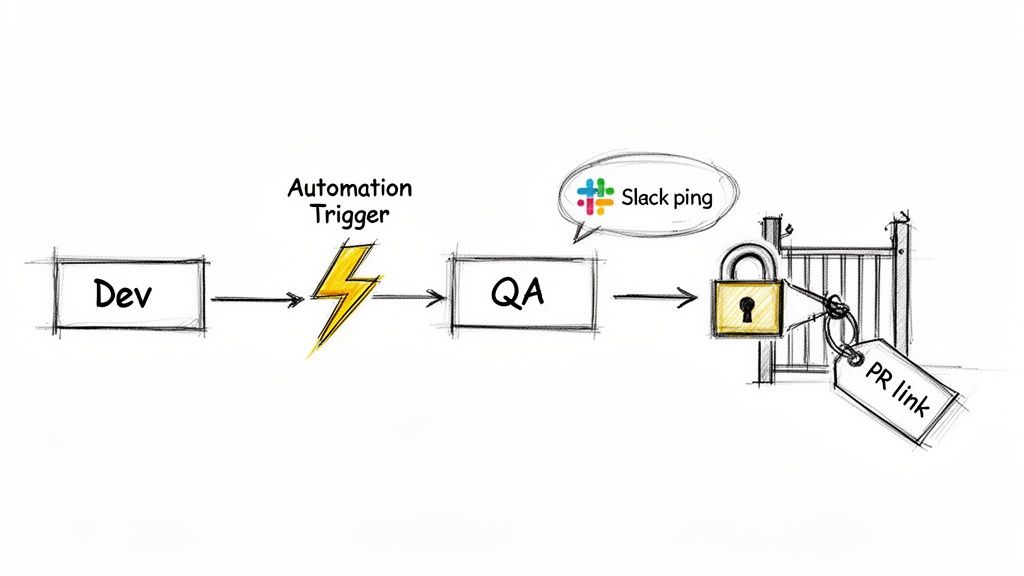
    Flowchart showing a software release process: Dev, Automation Trigger, QA, Slack ping, and a locked gate with a PR link.

    Manual handoffs are where release plans crack. A developer marks a task 'done,' but the notification gets buried in a noisy Slack channel, or the QA team never gets the memo. This communication friction causes delays, forcing leads to waste time chasing updates.

    This is where intelligent, automated handoffs and quality gates built right into your Jira workflow completely change the game. By setting up smart triggers, you can enforce your Definition of Ready and Definition of Done automatically. The system becomes the enforcer, creating a self-policing process that keeps your release on track.

    Automating the Handoff From Development to QA

    Let’s focus on the critical handoff from development to quality assurance. In a manual world, this step is a mess of comments and DMs. We can eliminate that ambiguity.

    Here's how to automate it: when a developer completes their 'Dev' checklist, a Nesty automation rule can trigger a chain reaction:

    • Reassign the Ticket: The Jira issue is instantly assigned to the correct QA lead or a shared QA user group. No more "Who's picking this up?"
    • Send a Targeted Notification: A message is sent to a specific Slack or Microsoft Teams channel (like #qa-team-alerts), tagging the new assignee with a direct link to the ticket.
    • Unlock the Next Phase: The 'QA Testing' checklist, previously locked and hidden, becomes visible and active for the QA team.

    This automated sequence creates a clean, immediate handoff. There's no guesswork or lag time. The process moves forward the moment prerequisite work is done.

    Enforcing Quality Gates With Blockers

    Automated handoffs become truly powerful when paired with quality gates—mandatory checkpoints that stop a task from moving forward until specific criteria are met. This is how you bake quality directly into your release management with Jira.

    For instance, configure a blocker that prevents the 'Dev Deployment' checklist from being completed until a pull request link is added to a custom field on the Jira ticket. If a developer tries to check the final box without the PR link, a message pops up telling them exactly what’s missing.

    Actionable Insight: Design your workflow to make it impossible to do things the wrong way. By automating quality gates, you shift the responsibility for process compliance from people to the system itself.

    This approach is perfect for enforcing prerequisites. You can block a handoff to QA until unit test results are attached, or prevent a staging deployment until security scan reports are uploaded, eliminating manual verification. To dial in the testing side of this, check out these strategies for managing test cases in Jira, which fit perfectly with these automated gates.

    The impact is huge. Swiss Re, coordinating releases for 12 interconnected applications, saw communication overhead consume over 50% of the release team’s time. By automating handoffs in Jira, they cut that overhead in half and saw 30% faster cycle times. You can get more details on how Jira transformed their release process.

    Real-World Examples of Automated Gates

    Here are practical quality gates you can build to bulletproof your release workflows:

    • Peer Review Approval: Block a ticket from moving to 'Ready for QA' until a 'Code Review' sub-task is marked 'Approved' by at least one other developer.
    • Documentation Check: Lock the 'Ready for Staging' phase until a link to the updated Confluence documentation is added to the main release ticket.
    • Product Owner Sign-off: Keep the final production deployment checklist locked until the Product Owner clicks a custom 'Approve for Release' button inside the Jira issue.

    By setting up these automated gates and handoffs, you’re not just tracking work—you’re building a robust, self-documenting, and compliant workflow. Your Jira ticket becomes the central orchestrator for your entire release, guaranteeing quality and consistency.

    Practical Automation Recipes for Your Release Process

    Theory is one thing; practical, reusable templates are another. Let's dig into concrete "recipes" you can implement directly in your Jira release process.

    Think of these as actionable blueprints for building a more reliable and speedy delivery pipeline.

    Recipe 1: The Multi-Environment Deployment

    This is the classic workflow for most software teams. This recipe ensures that progression through dev, staging, and production is smooth and compliant.

    Here’s how to structure this inside a release ticket:

    1. Phase 1: Development Deployment

      • Deploy the build to the development server.
      • Run initial smoke tests.
      • Gate: Block completion until the build number is entered in a custom field.
    2. Phase 2: Staging Deployment & QA

      • Deploy the build to the staging server.
      • Execute the full regression test suite.
      • Conduct user acceptance testing (UAT).
      • Gate: Block completion until the UAT sign-off document is attached.
    3. Phase 3: Production Rollout

      • Schedule the production deployment window.
      • Execute pre-flight checks.
      • Deploy to production.
      • Gate: Block completion until post-deployment monitoring is confirmed stable.

    The automation between phases is key. With an app like Nesty, completing the "Development Deployment" checklist can instantly reassign the ticket to the QA team, ping them in Slack, and unlock the "Staging Deployment & QA" checklist. This creates a seamless, auditable flow.

    Recipe 2: The Streamlined Hotfix Release

    When a critical bug appears in production, speed is essential. A hotfix process can't afford the lengthy checks of a standard release. This recipe provides an accelerated workflow for urgent patches.

    The key is a condensed process that prioritizes rapid validation and deployment while maintaining essential safeguards.

    • Step 1: Identify & Verify

      • Link the original production bug ticket.
      • Confirm you can reproduce the bug.
      • Get emergency approval from the Product Owner.
    • Step 2: Develop & Test

      • Create a dedicated hotfix branch.
      • Write a targeted regression test for this specific bug.
      • Gate: Block deployment until a senior developer approves the pull request.
    • Step 3: Deploy & Monitor

      • Deploy the fix directly to production.
      • Monitor system health and logs for 15 minutes.
      • Communicate the fix to stakeholders and support teams.

    A great hotfix process is a completely different workflow designed for a specific, high-stakes scenario. To make this work, lean on established CI/CD best practices. For a deeper dive, the guide on the Top 10 CI CD Pipeline Best Practices for 2025 is an excellent resource.

    Actionable Insight: Having a hotfix workflow pre-built in Jira turns a potential crisis into a calm, controlled procedure. No more panic, just execution.

    Automation at a Glance

    So, how do all these handoffs and gates actually work? Here are the most common and powerful automation triggers you can set up to make your release workflows self-managing.

    Automation Goal Trigger Condition (When This Happens…) Automated Action (…Do This)
    Handoff to QA All development tasks in a phase are complete. Reassign the release ticket to the QA lead and post a message in the #qa-team Slack channel.
    Enforce UAT Sign-off The "Deploy to Staging" checklist is complete. Transition the ticket to "Awaiting UAT" and lock the "Deploy to Production" checklist until a sign-off doc is attached.
    Notify Stakeholders The release ticket is transitioned to "Deployed." Send an automated email and a Teams message to the product and marketing teams announcing the new release.
    Create Post-Release Task The "Deploy to Production" checklist is complete. Automatically create a sub-task assigned to DevOps titled "Monitor Production Health for 1 Hour."
    Verify DoD A user tries to transition the ticket to "Done." A validation rule checks if all required fields (like build number and test results) are filled. If not, the transition is blocked.

    This table shows how simple "if-then" logic can eliminate missed steps, delays, and human error from your release cycle.

    Recipe 3: The Feature Flag Rollout

    Modern releases often use feature flags for phased rollouts, de-risking deployment by enabling functionality for a small slice of users first. Managing this in Jira requires a different kind of checklist.

    This recipe tracks the gradual exposure of a feature over time.

    Feature Rollout Plan

    Phase Key Tasks Target Audience
    Internal Testing Enable flag for the internal QA team and all company employees. 0% of Customers
    Beta Group Enable flag for a select group of beta testers. Monitor feedback channels. 5% of Customers
    Gradual Rollout Increase exposure to 25%, then 50% of the user base. Monitor performance metrics. 25%-50% of Customers
    Full Release Enable flag for all users. Plan for the removal of the old code path. 100% of Customers

    Each phase becomes its own checklist within the main Jira ticket. When the "Beta Group" phase is marked complete, an automation can create a follow-up task for the DevOps team to bump the feature flag to 25%. This keeps Jira perfectly synced with technical reality.

    These recipes are a starting point. The real power comes from adapting them to your team's specific needs. To learn more about building these kinds of intelligent workflows, explore advanced techniques for Jira workflow automation. This is how you turn Jira from a passive tracking system into an active, automated engine for delivery.

    Keeping an Eye on Release Health in Real-Time

    Automating handoffs and building quality gates is a huge step forward, but the next step is to use data to improve your process. You need clear, real-time visibility into release health—without spending hours manually compiling reports.

    This is where your centralized release ticket becomes the star. By running everything through a single, well-structured Jira issue, you create a command center perfect for both execution and analysis.
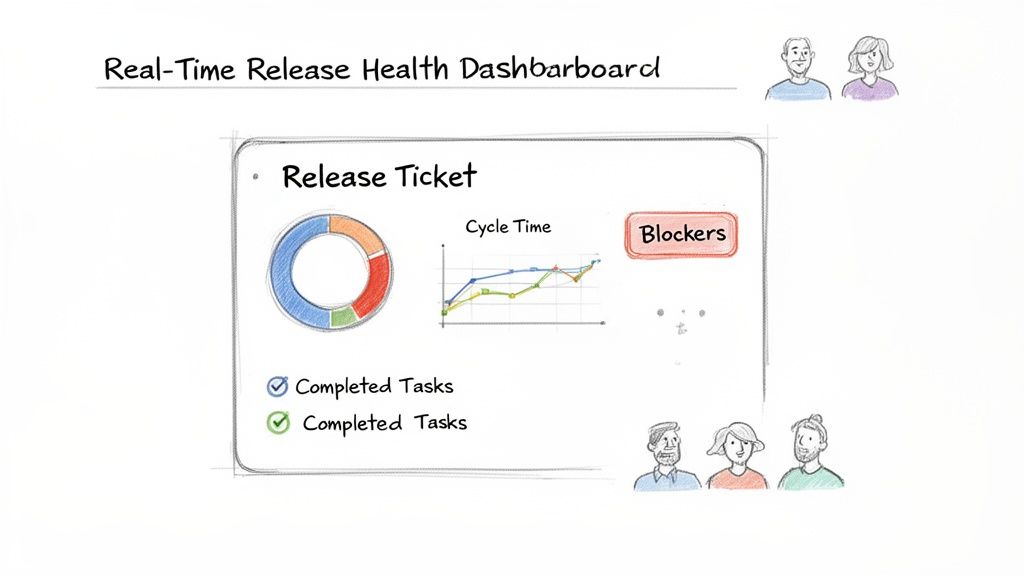
    A real-time release health dashboard showing a release ticket with cycle time, progress, and blockers.

    The Release Ticket as Your Single Source of Truth

    Once your workflow is running, the central ticket becomes a living dashboard. Anyone—from a product manager to an executive—can look at that one ticket and instantly get what they need:

    • Overall Progress: Which stage are we in? What percentage is done?
    • Active Blockers: Is anything stuck? Who owns the blocker?
    • Completed Milestones: What’s been finished and who signed off?
    • What's Next: What’s in the queue for each team?

    This transparency makes most status update meetings obsolete. The ticket is the update, available 24/7.

    Using Data to Proactively Improve

    A single source of truth isn't just for daily tracking; it’s for collecting data to improve the process. Every checklist item, handoff, and approval is timestamped and tracked in Jira. You are automatically collecting a goldmine of performance metrics.

    This structured data is exactly what Jira Dashboards were made for. You can set up gadgets to track key metrics across all releases, helping you shift from reacting to fires to proactively optimizing your flow.

    Actionable Insight: When your process lives inside Jira, your metrics are generated automatically. You stop guessing where your bottlenecks are and start seeing them clearly in the data.

    Key Metrics for Your Release Dashboard

    Start with a few metrics that give you a clear, high-level picture of your release pipeline’s health.

    Here are the essentials to track:

    • Cycle Time per Phase: How long does QA testing or staging validation take on average? A rising number is a red flag that a stage needs investigation.
    • Blocker Frequency: Which quality gates are triggered most often? If the "PR link missing" blocker appears constantly, it's a sign you need a pre-commit checklist or better team communication.
    • Handoff Lag Time: What’s the average delay between one phase ending and the next one starting? A long pause between ‘Dev Complete’ and ‘QA Started’ may point to a resource crunch.
    • Release Success Rate: What percentage of releases go live without needing a hotfix or rollback within 24 hours? This is the ultimate test of your process's quality.

    Monitoring these trends helps you spot recurring problems and fix the root cause. Visualizing this data makes patterns impossible to miss. To turn this raw data into actionable insights, learn how to create a report in Jira. This is how you close the loop, using visibility to drive continuous improvement.

    Common Questions About Managing Releases in Jira

    As you formalize your release process in Jira, you'll encounter a few tricky situations. Here’s how to handle common hurdles.

    How Can I Manage Cross-Project Dependencies in Jira?

    Dependencies are a major headache in release management. While Jira's native issue linking is available, it's static. You get a list of links with no real-time status, forcing release managers to chase updates.

    A better approach is to make your centralized release ticket the single source of truth. Create a dedicated checklist inside that ticket called "Cross-Project Dependencies" and link to the specific issues your release is waiting on.

    Actionable Insight: Pull dependency tracking directly into your main release ticket to turn a passive list into an active, automated quality gate. The release cannot move forward until every dependency is resolved.

    Using an app like Nesty, you can take this further. Set up automation that actively monitors the status of those linked issues. For example, create a blocker that prevents the 'Deployment to Staging' checklist from starting until every linked dependency ticket is marked 'Done.' This centralizes tracking and makes dependency management a proactive, hands-off part of your workflow.

    What's the Best Way to Handle Rollbacks?

    A good release plan must cover what to do when things go wrong. The key to handling rollbacks is to plan for them before you need one. Have a calm, procedural response ready instead of a last-minute scramble.

    Inside your main release ticket, include a dedicated—but initially dormant—checklist for your "Rollback Procedure." This should outline every step required to safely revert the deployment, from database restores to flipping feature flags off.

    You can use automation to keep this section locked until a failure is detected. For instance, if a "Production Validation" task fails, a trigger can automatically:

    • Unlock and assign the "Rollback Procedure" checklist to the DevOps team.
    • Send an urgent notification to key stakeholders in a dedicated Slack or Teams channel.
    • Change the main ticket's status to "Rollback in Progress" for full visibility.

    This provides a rapid, consistent, and documented response to failures, drastically reducing downtime and stress.

    Can This Jira Process Integrate With CI/CD Tools?

    Absolutely. A tight integration between your Jira workflow and your CI/CD pipeline is where the magic happens. The Jira release ticket manages the process—quality gates, handoffs, and approvals—while your CI/CD tool (like Jenkins, GitLab CI, or CircleCI) handles the technical execution of builds and deployments.

    The connection is typically handled through webhooks or API calls, creating a powerful two-way conversation.

    Here’s a common integration flow:

    1. Jira to CI/CD: When the "Deploy to Staging" task is approved in your Jira ticket, an automation sends a webhook to your CI/CD tool.
    2. CI/CD Executes: The webhook triggers the corresponding deployment job in Jenkins, which builds and ships the code to staging.
    3. CI/CD to Jira: Once Jenkins reports a successful deployment, it calls Jira's API to automatically check off the "Deployment Successful" task in your checklist.

    That final step in Jira can then trigger the next phase, like notifying the QA team that the new build is ready. This creates an automated loop between process management in Jira and technical execution in your CI/CD platform.


    Ready to stop chasing manual updates and build a predictable, automated release pipeline? Harmonize Pro's flagship app, Nesty, transforms Jira into a true command center for your releases. With unlimited nested checklists, intelligent triggers, and powerful quality gates, you can build the self-managing workflows described in this guide. Try Nesty today and bring clarity and control to your release management with Jira.
  • 8 Actionable Test Environment Management Best Practices for 2025

    8 Actionable Test Environment Management Best Practices for 2025

    In modern software development, the speed of delivery is matched only by the demand for quality. Yet, countless engineering hours are lost to a common, persistent bottleneck: mismanaged test environments. Issues like configuration drift, data inconsistencies, and manual handoffs create friction, delay releases, and allow critical bugs to slip into production. The difference between a high-performing team and a struggling one often lies in their approach to testing infrastructure. A robust strategy for test environment management is no longer a luxury; it is a fundamental component of a successful delivery pipeline.

    This guide moves beyond theory to provide a definitive roundup of actionable test environment management best practices. We will explore 8 critical strategies that you can implement today to build a more resilient, efficient, and reliable workflow. You will learn how to:

    • Achieve perfect environment parity and eliminate configuration drift.
    • Automate provisioning and teardown to save time and reduce costs.
    • Master test data management for consistent, reliable testing outcomes.
    • Implement proactive monitoring to catch issues before they impact your team.
    • Streamline handoffs between development, QA, and release teams.

    By mastering these practices, you can eliminate rework, accelerate feedback loops, and empower your teams to ship with confidence. This listicle is designed for software teams, DevOps engineers, and QA professionals who need practical, specific steps to transform their testing infrastructure from a source of frustration into a strategic asset. Let's dive into the core practices that will stabilize your environments and supercharge your release velocity.

    1. Environment Parity and Configuration Management

    The infamous "it works on my machine" problem is a classic source of friction between development and operations teams. This issue almost always stems from a lack of environment parity: subtle (or significant) differences between development, staging, and production environments. Achieving parity means ensuring that every environment, from a local developer laptop to the final production server, is as identical as possible. This consistency is a cornerstone of effective test environment management best practices.

    It covers everything from operating system versions and patch levels to installed libraries, application dependencies, network configurations, and third-party service endpoints. By standardizing these elements, you create a predictable and reliable pipeline where a test passed in a lower environment provides a high degree of confidence that the code will behave exactly the same in production. This minimizes deployment-day surprises, reduces bug resolution cycles, and accelerates the entire software delivery lifecycle.

    Why It's a Top Priority

    Maintaining environment parity is crucial because it validates the integrity of your entire testing process. Without it, you are not truly testing how your application will perform live. A test that passes in a staging environment with a different database version or API dependency than production is, at best, an approximation. At worst, it provides a false sense of security, allowing critical bugs to slip through unnoticed.

    Cloud-native leaders have championed this practice for years. For instance, Spotify uses Infrastructure as Code (IaC) to programmatically define and provision identical staging and production setups, while Amazon leverages AWS CloudFormation templates to spin up consistent, on-demand test environments that mirror their live infrastructure.

    Actionable Implementation Tips

    Achieving and maintaining parity requires a deliberate, tool-driven strategy. Here’s how to implement it effectively:

    • Embrace Containerization: Use Docker to package your application and its dependencies into a single, portable container. Define your environment in a Dockerfile and share it across all teams to ensure identical runtimes everywhere, from local development with Docker Compose to production clusters managed by Kubernetes.
    • Implement Infrastructure as Code (IaC): Use tools like Terraform or Ansible to define your infrastructure (servers, load balancers, databases) in version-controlled configuration files. This makes provisioning a new, identical environment a repeatable command like terraform apply.
    • Version Control All Configurations: Store all environment configuration files—not just application code—in a Git repository. This includes Dockerfiles, Terraform scripts, and application settings. Use a pull request workflow for all changes to ensure peer review and a complete audit trail.
    • Automate Environment Audits: Write scripts to periodically check for "configuration drift." For example, create a scheduled CI/CD job that uses aws cli or az cli to compare the live state of your cloud resources against your Terraform state file and alert on any discrepancies.

    2. Automated Test Environment Provisioning

    The days of manually configuring servers and waiting days for a new test environment are over. Modern software delivery demands speed and agility, which is where automated test environment provisioning becomes a non-negotiable practice. This approach involves using code and automation tools to create, configure, and tear down complete, isolated test environments on-demand. By scripting the entire process, teams can eliminate manual effort, drastically reduce human error, and accelerate feedback loops.

    This automation is the engine behind modern Continuous Integration/Continuous Delivery (CI/CD) pipelines. Instead of sharing a single, static staging environment that often becomes a bottleneck, developers can spin up a fresh, pristine environment for every feature branch or pull request. This ensures tests are run in a clean, isolated state, free from the interference of other ongoing work, making it a cornerstone of effective test environment management best practices.

    Why It's a Top Priority

    Automated provisioning directly impacts development velocity and testing reliability. When environments are created manually, they are slow to build, prone to configuration drift, and costly to maintain. Automation transforms them into ephemeral, disposable resources that can be summoned in minutes and destroyed just as quickly, optimizing resource usage and cost. This enables parallel testing at a massive scale, which is impossible with manual methods.

    Hyperscalers have perfected this approach. For example, GitHub Actions can automatically spin up ephemeral test environments for each pull request, providing immediate feedback. Similarly, Google Cloud and AWS leverage their native Infrastructure as Code (IaC) tools, Terraform and CloudFormation respectively, to provision complex test infrastructures on-demand for thousands of concurrent test runs. Learn more about the core principles of automating complex workflows to see how this fits into a broader strategy.

    Actionable Implementation Tips

    Adopting automated provisioning requires a shift to an "everything as code" mindset. Here are practical steps to get started:

    • Define Infrastructure as Code (IaC): Start by writing Terraform or AWS CloudFormation scripts that define your complete environment, from virtual machines and networks to databases. Commit these scripts to a Git repository alongside your application code to keep them in sync.
    • Leverage Containerization: Use Docker and a docker-compose.yml file to define how your application and its dependent services run together. Containers provide lightweight, fast-starting, and isolated runtimes that are perfect for ephemeral test environments.
    • Integrate with Your CI/CD Pipeline: Create a job in your Jenkins, GitLab CI, or GitHub Actions workflow that runs terraform apply to build the environment whenever a new pull request is opened. This job should run before the testing stage.
    • Automate Cleanup: Implement an automated teardown job that runs terraform destroy after tests are complete or when a pull request is merged/closed. This crucial step prevents orphaned resources, avoids resource leaks, and minimizes cloud costs.
    • Secure Your Secrets: Do not hardcode secrets. Use a dedicated secrets management tool like HashiCorp Vault or AWS Secrets Manager. Your CI/CD pipeline should fetch secrets at runtime and inject them into the environment as environment variables.

    3. Test Data Management and Isolation

    Unreliable test results are often not a code problem but a data problem. When tests interfere with each other by modifying the same dataset, or when test data is inconsistent, the entire testing process becomes fragile and untrustworthy. Test data management and isolation is the practice of creating stable, repeatable, and isolated datasets for testing activities. It ensures that each test run starts from a known state and does not impact other concurrent tests, which is a cornerstone of reliable automated testing.

    This discipline involves generating predictable datasets, masking sensitive information to comply with regulations like GDPR and HIPAA, and resetting the environment's state after each test. Proper test data management prevents data contamination, ensures tests are deterministic, and allows for parallel execution without conflict. It is fundamental to building a robust and scalable CI/CD pipeline and is a critical component of any mature test environment management best practices strategy.

    Why It's a Top Priority

    Effective test data management is crucial because it directly impacts the reliability and validity of your test outcomes. Without it, you face flaky tests that fail intermittently for no clear reason, leading to wasted engineering time and a loss of confidence in your test suite. A test that passes only because it ran before another test that corrupted its data provides a false positive, while a failure caused by bad data creates a false negative, masking the real quality of the code.

    Leading technology and financial companies treat test data as a first-class citizen. For example, Stripe generates synthetic data that mimics real-world payment patterns, allowing them to test complex transaction scenarios without ever touching real customer information. Similarly, major financial institutions use sophisticated data masking and subsetting tools to create realistic, anonymized datasets for performance testing, ensuring they meet strict PCI compliance standards.

    Actionable Implementation Tips

    Implementing a robust data strategy requires a combination of tooling and defined processes. Here’s how to do it effectively:

    • Generate Data Programmatically: Instead of relying on static seed files, use libraries like Faker (for many languages) or built-in test data factories in frameworks like Ruby on Rails or Laravel to generate fresh, realistic data for each test run. This makes tests self-contained and easy to understand.
    • Leverage Database Snapshots: For integration tests, use tools like TestContainers to spin up an ephemeral database in a Docker container for each test suite. Before each test, restore a known-good database snapshot to ensure a perfectly clean slate every time.
    • Isolate Test Database Instances: Never share a test database. As part of your automated environment provisioning, include a script that creates a dedicated database instance for that specific test run. The database credentials should be dynamically generated and passed to the application.
    • Mask and Anonymize PII: When using production-like data, use tools like Tonic or Spherity to systematically find and replace personally identifiable information (PII) before loading it into a non-production environment. This is non-negotiable for complying with data privacy laws.

    4. Environment Monitoring and Health Checks

    A test environment is only useful when it is stable, available, and performing as expected. Intermittent failures, slow response times, or unexpected downtime can derail testing schedules, create false negatives, and erode trust in the QA process. Continuous monitoring and automated health checks are essential test environment management best practices that transform environment stewardship from a reactive, fire-fighting exercise into a proactive, preventative discipline.

    This practice involves actively tracking the state of your test environments by collecting and analyzing a wide range of metrics. It covers everything from infrastructure health (CPU, memory, disk space) to application performance (response times, error rates) and the availability of critical dependencies like databases and third-party APIs. By establishing a baseline for normal behavior, you can automatically detect anomalies, diagnose root causes faster, and resolve issues before they block entire teams.

    Why It's a Top Priority

    Proactive monitoring is critical because it prevents test flakiness and saves countless hours of debugging. When a test fails, the first question should be "Is it the code or the environment?" without solid monitoring, teams waste valuable time investigating environmental issues disguised as application bugs. A healthy environment ensures that test results are reliable, which is the entire purpose of the testing phase.

    Industry leaders treat their test environments with the same operational rigor as production. Netflix, for example, employs sophisticated health checks to detect service degradation in its complex microservices architecture, ensuring test environments accurately reflect production behavior. Similarly, Slack provides internal status dashboards for all service dependencies, allowing engineers to immediately verify environment health before starting a test run.

    Actionable Implementation Tips

    Implementing a robust monitoring strategy requires a combination of the right tools and a clear plan. Here’s how to get started:

    • Implement Application Health Check Endpoints: In each service, create a dedicated API endpoint like /health that checks its internal state and dependencies (e.g., database connectivity) and returns a simple 200 OK or 503 Service Unavailable. Your CI/CD pipeline should poll this endpoint before running tests.
    • Combine Infrastructure and Application Metrics: Use a monitoring tool like Datadog, New Relic, or an open-source stack like Prometheus and Grafana to create a dashboard. This dashboard should display both system metrics (CPU, RAM) and key application metrics (HTTP 5xx error rates, API latency) in one place.
    • Set Up Meaningful, Actionable Alerts: Configure alerts to notify your team's Slack or PagerDuty channel when a critical metric breaches a threshold (e.g., CPU utilization > 90% for 5 minutes). Ensure alerts include context and a link to the dashboard to speed up troubleshooting.
    • Monitor Third-Party Dependencies: Your application's health depends on external services. Use synthetic monitoring tools like Checkly or Uptrends to continuously ping the health endpoints of critical third-party APIs your test environment relies on.
    • Automate Common Remediation Tasks: Write simple scripts that can be triggered automatically by alerts to perform basic remediation. For example, if a "disk full" alert fires, a script can automatically run to clear old log files or temp directories.

    5. Clear Definition of Ready and Definition of Done for Environments

    A common source of wasted cycles and team frustration is starting tests in an environment that isn't fully prepared or, conversely, promoting code before it has been thoroughly validated. To prevent this, leading teams borrow concepts from Agile methodologies, establishing a clear Definition of Ready (DoR) and Definition of Done (DoD) specifically for test environments. This practice introduces formal, agreed-upon quality gates that ensure an environment is stable and configured correctly before testing begins and that all test activities are completed before the code moves to the next stage.

    The DoR acts as a pre-flight checklist, preventing QA from encountering avoidable setup issues, while the DoD serves as an exit checklist, guaranteeing that no validation steps were missed. This structured approach creates a predictable, transparent workflow, reduces the feedback loop for environment-related bugs, and builds confidence in the testing process. It is a fundamental component of mature test environment management best practices that bridges the gap between environment provisioning and test execution.

    Why It's a Top Priority

    Without explicit DoR/DoD criteria, teams operate on assumptions. Developers might assume the environment is ready when it isn't, and QA might push code forward based on an incomplete test run. This ambiguity leads to failed tests, rework, and schedule delays. Formalizing these entry and exit criteria transforms the handoff process from a vague "it's ready" into a verifiable, data-driven event.

    Platform engineering teams at companies like Google Cloud have institutionalized this by implementing automated validation of DoR criteria before a test suite is even allowed to execute. Similarly, Amazon enforces a multi-stage DoD across its dev, staging, and production environments, ensuring code meets stringent quality, performance, and security bars at each step before promotion. This discipline is key to managing complexity at scale.

    Actionable Implementation Tips

    Implementing DoR and DoD for environments requires collaboration between development, QA, and operations. Here’s how to put it into practice:

    • Define Criteria Collaboratively: Host a meeting with Dev, QA, and DevOps to create specific, measurable checklists for DoR and DoD. Store these checklists in a shared Confluence or Notion page so everyone has access.
    • Establish a "Ready" Checklist (DoR): Your Definition of Ready checklist should include actionable items: all services return 200 OK from their /health endpoint, the correct application version is deployed (verify via an /info endpoint), and required test data is seeded.
    • Establish a "Done" Checklist (DoD): Your Definition of Done checklist should confirm: 100% of automated E2E tests passed, performance test results are within 2% of the baseline, SonarQube security scan passed with zero critical vulnerabilities, and all test results are logged in TestRail.
    • Automate Gate Checks: Integrate these checks directly into your CI/CD pipeline. For example, add a script that polls the /health endpoints and fails the pipeline if any service is unhealthy (DoR). Add a quality gate that checks the SonarQube API for scan results before allowing a merge to the main branch (DoD).
    • Visualize Status: Create a status page or a dashboard that displays the DoR/DoD checklist for each active test environment. This provides a clear, real-time signal to the entire team about an environment's readiness for the next stage. For an in-depth guide on structuring these processes, you can learn more about Jira workflow best practices.

    6. Automated Environment Teardown and Cost Optimization

    Ephemeral, on-demand test environments are a powerful asset, but they can quickly become a significant financial drain if left running indefinitely. Automated environment teardown is the practice of systematically and automatically de-provisioning test environments once they are no longer needed. This discipline is a critical component of modern test environment management best practices, directly combating resource waste and controlling cloud expenditure.

    This process involves establishing policies and automation scripts that clean up resources after a test run is complete, a feature branch is merged, or a predefined time-to-live (TTL) expires. By implementing automated cleanup, you prevent the accumulation of "zombie" environments that consume valuable compute, storage, and network resources without providing any value. This not only optimizes costs but also ensures a clean slate for future tests, preventing configuration drift and issues caused by lingering, stale environments.

    Why It's a Top Priority

    In the pay-as-you-go cloud model, every idle resource translates directly to unnecessary spending. Without automated teardown, cloud bills can spiral out of control, and teams may become hesitant to spin up new environments for fear of the associated cost. This creates a bottleneck that stifles innovation and slows down testing cycles. Effective cost optimization ensures that engineering teams can leverage the full power of dynamic environments without financial repercussions.

    This practice is standard at hyperscale companies where infrastructure costs are a primary concern. For example, Uber implements aggressive automated cleanup policies to manage its vast microservices testing infrastructure, minimizing cloud waste. Similarly, AWS itself promotes the use of lifecycle policies and tags to automatically terminate or stop test instances after a set duration, a best practice adopted by countless organizations on its platform.

    Actionable Implementation Tips

    A proactive approach to cleanup and cost control is essential. Here’s how to put it into practice:

    • Implement Time-Based Expiration Tags: When provisioning resources with Terraform or CloudFormation, automatically apply a tag like destroy-after: 2024-10-28T18:00:00Z. Then, run a scheduled nightly script (e.g., a Lambda function) that scans for resources with this tag and de-provisions any that have passed their expiration date.
    • Integrate Cleanup into CI/CD Pipelines: In your CI/CD tool, configure a job that triggers on pull request merge or close events. This job's sole purpose is to execute the terraform destroy command for the associated environment, ensuring no resources are left behind.
    • Set Up Budget Alerts and Quotas: Go to your cloud provider's billing console (AWS Cost Explorer or Azure Cost Management) and create a budget for your testing environments. Configure an alert to send a notification to a Slack channel when spending reaches 80% of the budget.
    • Leverage Spot Instances: For non-critical, interruptible workloads like performance or load testing, modify your IaC scripts to use cloud providers' spot instances instead of on-demand ones. This can reduce compute costs by up to 90%.

    7. Environment Versioning and Configuration Control

    Just as application code evolves, so do the environments that host it. Treating environment configurations as an afterthought is a recipe for untraceable errors and painful rollbacks. The solution is to apply the same rigor to your infrastructure as you do to your source code. Environment versioning means managing all configuration files under a strict version control system, like Git, creating an immutable, auditable history of every change.

    This practice transforms your infrastructure from a fragile, manually-configured entity into a predictable and reproducible asset. It allows teams to pinpoint exactly when a change was made, who made it, and why. By versioning configurations, you can easily compare differences between environments, roll back to a previously known good state, and coordinate complex infrastructure changes across multiple teams with confidence. This approach is fundamental to modern test environment management best practices, providing the accountability needed to maintain stable and reliable systems.

    Why It's a Top Priority

    Without version control, your environment's state is ephemeral and undocumented. A manual change made to fix a "quick issue" can introduce subtle regressions that are nearly impossible to debug later. Versioning your environment configurations provides a single source of truth and an explicit audit trail. This transparency is crucial for security, compliance, and operational stability, as it ensures that every modification is deliberate, reviewed, and documented.

    This principle is a core tenet of the Infrastructure as Code (IaC) movement. For instance, GitHub manages its own vast infrastructure by storing all environment definitions in Git repositories, enabling a full version history and peer-reviewed change process. Similarly, teams at Shopify and Slack version-control their Kubernetes manifests alongside application code, ensuring infrastructure and application deployments are always synchronized.

    Actionable Implementation Tips

    Adopting a version-controlled approach to environment management requires a combination of tools and disciplined processes. Here’s how to get started:

    • Centralize Configurations in Git: Create a dedicated Git repository for all infrastructure code, including Terraform scripts, Ansible playbooks, and Kubernetes manifests. This repository becomes your infrastructure's single source of truth.
    • Embrace Infrastructure as Code (IaC): Use tools like Terraform, AWS CloudFormation, or Helm to define every component of your environment in code. Avoid manual changes in the cloud console; all modifications must be made through code.
    • Enforce Pull Request (PR) Workflows: Configure your Git repository to require pull requests for all changes to the main branch. Mandate that at least one other team member must review and approve the PR before it can be merged. This ensures peer review and prevents unauthorized changes.
    • Tag and Align Versions: When you release a new version of your application, also create a corresponding Git tag for your infrastructure configuration (e.g., infra-v1.2.0 aligns with app-v1.2.0). This makes it simple to roll back both application and infrastructure together if an issue occurs.
    • Keep Secrets Separate: Never commit secrets (API keys, passwords) into your Git repository. Use a secrets management tool like HashiCorp Vault or AWS Secrets Manager. Your IaC code should reference these secrets by name, and the CI/CD pipeline will inject the actual values at runtime.

    8. Cross-Team Handoff Automation and Notifications

    The transition of a software build from a development environment to QA, then to staging, and finally to production is a critical process often plagued by manual errors and communication delays. A manual handoff relies on emails, chat messages, or verbal updates, creating opportunities for missed steps, forgotten artifacts, and idle time as teams wait for notifications. Automated handoff workflows are a core component of modern test environment management best practices that solve this problem directly.

    By automating these transitions, you create a structured, repeatable, and transparent process. When a developer marks a feature as "ready for QA," an automation rule can trigger a series of actions: verifying that all prerequisites are met, deploying the build to the QA environment, reassigning the task to the QA team, and sending an instant notification with all relevant context. This eliminates the "over-the-wall" mentality, reduces coordination overhead, and significantly shortens the feedback loop.

    Why It's a Top Priority

    Automated handoffs are crucial for maintaining momentum in a continuous delivery pipeline. Delays between stages are a common source of waste, directly impacting time-to-market. When a QA engineer has to manually check if a new build is deployed or chase a developer for test notes, valuable testing time is lost. This manual friction compounds in complex workflows involving multiple teams and environments, leading to release bottlenecks.

    Leading tech and regulated companies have mastered this to accelerate delivery. Microsoft, for its Azure services, uses highly structured, automated handoff processes to manage deployments across globally distributed teams and complex infrastructure. Similarly, financial services firms integrate automated handoffs with regulatory approval gates, ensuring compliance is built into the workflow, not an afterthought.

    Actionable Implementation Tips

    Implementing a robust handoff system requires a clear map of your delivery process and the right tools to orchestrate it.

    • Map All Environment Transitions: Use a tool like Miro or Lucidchart to visually map every handoff point in your delivery pipeline (e.g., Dev → QA, QA → Staging). For each transition, clearly define the entry and exit criteria.
    • Define Required Artifacts: For each handoff, create an explicit checklist of required artifacts. For example, the handoff to QA might require links to unit test results, a code coverage report, and the passing SonarQube scan. Use automation to block transitions if these are missing.
    • Use Contextual, Instant Notifications: Configure your workflow automation tool (e.g., Jira Automation, GitHub Actions) to send an immediate alert to a specific Slack or Microsoft Teams channel. The notification should include a direct link to the Jira ticket, the build number, and a summary of what needs to be done.
    • Integrate Environment Health Checks: As the very first step in a handoff automation, add a script that calls the /health endpoint of the target environment (e.g., the QA environment). If the environment is unhealthy, the automation should fail immediately and notify the operations team, preventing a failed deployment. For a deeper dive into structuring these workflows, you can learn more about Jira workflow automation on harmonizepro.com.

    8-Point Test Environment Management Comparison

    Item Implementation Complexity 🔄 Resource Requirements ⚡ Expected Outcomes 📊 Ideal Use Cases 💡 Key Advantages ⭐
    Environment Parity and Configuration Management Medium — requires IaC, containers and discipline Moderate — infra, tooling (Terraform/Ansible), ops time Consistent test behavior; fewer "works on my machine" issues Multi-stage pipelines (dev→staging→prod); onboarding new engineers Reproducible environments; easier troubleshooting
    Automated Test Environment Provisioning High — IaC + CI/CD integration and orchestration High — compute, IaC expertise, CI runners Fast, on-demand, isolated test runs; parallelization Per-PR testing, large test suites, CI-driven workflows Eliminates manual setup; speeds feedback loops
    Test Data Management and Isolation High — data masking, seeding, lifecycle automation Moderate–High — DB tooling, storage, compliance controls Repeatable, isolated tests; reduced flakiness and data leaks E2E/regression tests; systems with sensitive data (PII/PCI) Ensures data privacy; improves test reliability
    Environment Monitoring and Health Checks Medium — dashboarding, alerts and log aggregation Moderate — monitoring platforms, metric storage Early detection of drift/issues; reduced false negatives Long-lived test envs; performance-sensitive applications Proactive issue detection; faster MTTR
    Clear Definition of Ready and Definition of Done Low–Medium — process design + automatable checks Low — documentation, lightweight automation Fewer premature tests; consistent environment promotions Teams practicing CI/CD or regulated releases Clear criteria for handoffs; reduced rework
    Automated Environment Teardown and Cost Optimization Medium — lifecycle policies + automation Low–Moderate — cost tooling, scheduling automation Lower cloud costs; reduced resource sprawl and drift Ephemeral environments; large-scale/parallel testing Cost savings; improved security and resource hygiene
    Environment Versioning and Configuration Control Medium — Git workflows + IaC validation Moderate — VCS, IaC tools, review processes Auditable configs; ability to roll back and reproduce states Regulated environments; disaster recovery planning Full audit trail; reproducibility and safer changes
    Cross-Team Handoff Automation and Notifications Medium–High — workflow design, integrations (Slack/Teams/Jira) Moderate — workflow engine, integrations, maintenance Fewer missed steps; faster, auditable handoffs across teams Complex multi-team deployments; regulated releases Eliminates manual coordination; improves visibility and compliance

    From Best Practices to Business Impact

    Navigating the complexities of modern software development requires more than just skilled engineers and innovative ideas; it demands a robust, reliable, and efficient pipeline from code commit to customer value. As we've explored, the often-overlooked discipline of test environment management is the linchpin that holds this entire process together. Adopting these test environment management best practices is not merely an IT housekeeping task; it's a fundamental strategic shift that directly impacts your organization's velocity, quality, and bottom line.

    By moving from chaotic, manual processes to a structured, automated framework, you transform your testing infrastructure from a constant source of friction into a powerful competitive advantage. The journey from bottleneck to accelerator begins with the principles we've detailed: achieving environment parity, automating provisioning and teardown, mastering test data, and implementing rigorous monitoring. These practices collectively dismantle the silos and guesswork that plague so many development cycles.

    Synthesizing the Strategy: Your Actionable Takeaways

    Mastering this domain is a journey, not a destination. The key is to start small and build momentum. Instead of attempting a complete overhaul overnight, focus on incremental improvements that deliver immediate value and build a foundation for future enhancements.

    Here are the most critical takeaways to begin your transformation:

    • Automation is Non-Negotiable: The single most impactful change you can make is to automate repetitive tasks. Start with environment provisioning using tools like Terraform or Ansible. Once that’s established, automate health checks, and finally, automate the teardown process to reclaim resources and control costs. Automation is your primary weapon against inconsistency and human error.
    • Treat Environments as Code (EaC): The principle of version-controlling your environment configurations, just as you do your application code, is paramount. This practice is the bedrock of achieving true environment parity, ensuring that what you test is an exact replica of what you deploy. It eliminates the "it worked on my machine" class of bugs and drastically reduces release-day surprises.
    • Clarity and Communication are Essential: Formalize your processes with clear definitions. A "Definition of Ready" for an environment entering QA and a "Definition of Done" for handoffs create unambiguous quality gates. Integrating automated notifications into your CI/CD pipeline and communication tools like Slack ensures that every stakeholder has real-time visibility, preventing delays caused by miscommunication.
    • Data Management is a First-Class Citizen: Ineffective test data management can invalidate your entire testing effort. Prioritize creating a strategy for generating realistic, anonymized, and isolated datasets. This not only improves the accuracy of your tests but also ensures compliance with privacy regulations like GDPR and CCPA, protecting your organization from significant risk.

    From Practice to Profit: The Broader Business Impact

    Implementing these test environment management best practices creates a ripple effect across the entire organization. Developers spend less time fighting fires and more time innovating. QA teams can execute tests with higher confidence and speed. Release managers can orchestrate deployments with predictable, repeatable outcomes.

    Ultimately, this operational excellence translates directly into tangible business value:

    • Faster Time-to-Market: A streamlined environment pipeline removes bottlenecks, allowing you to ship features and bug fixes to your customers more quickly.
    • Improved Product Quality: Consistent, reliable test environments lead to more thorough testing, catching bugs earlier in the cycle when they are cheaper and easier to fix.
    • Reduced Operational Costs: Automation, especially in environment teardown and resource optimization, directly cuts down on infrastructure spending.
    • Enhanced Team Morale: By eliminating frustrating, repetitive manual work and empowering teams with self-service capabilities, you create a more productive and satisfying work environment.

    The path forward is clear. Begin by auditing your current processes, identify the most significant pain point, and apply one of the practices discussed. Whether it's version-controlling a single environment's configuration or automating one health check, each step forward builds a more resilient and agile delivery ecosystem.


    Ready to turn these best practices into an automated, self-managing system? Harmonize Pro's Nesty for Jira orchestrates your entire environment management workflow directly within Jira, enforcing quality gates and automating handoffs. See how you can build a world-class testing infrastructure by visiting us at Harmonize Pro.

  • Master Software Deployment Best Practices: Your Actionable Guide to CI/CD Success

    Master Software Deployment Best Practices: Your Actionable Guide to CI/CD Success

    Software deployment best practices are the set of rules that separate high-performing teams from the rest. They transform risky, all-night release marathons into a smooth, automated, and repeatable process. The goal is simple: make every deployment a non-event.

    This guide provides an actionable blueprint for achieving that. We'll focus on the practical steps to automate builds and tests, maintain perfectly consistent environments, and leverage smart rollout strategies to deliver value to users faster and without the drama.

    The Blueprint for Flawless Software Deployment

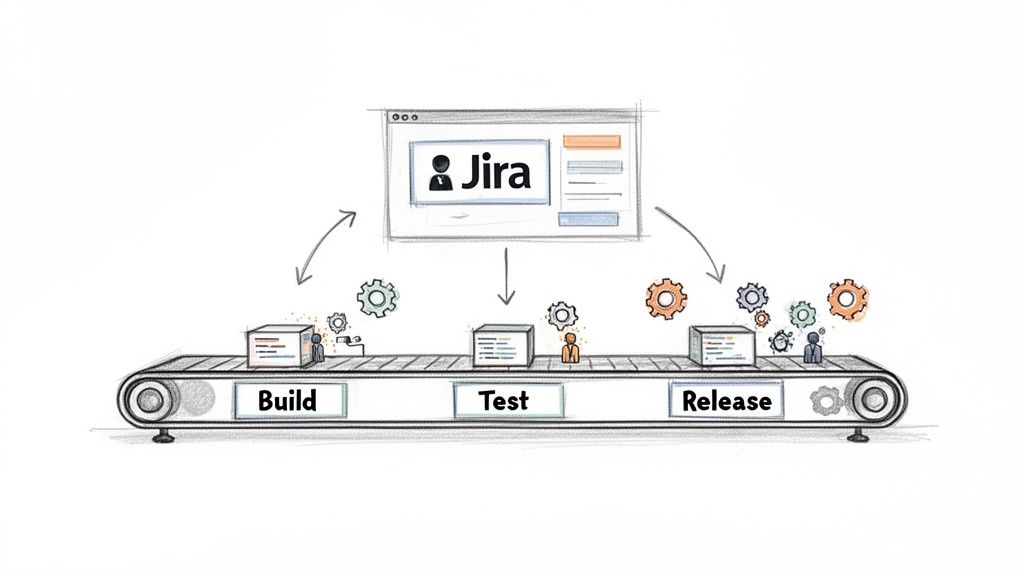
    Illustration of a software deployment pipeline with Build, Test, Release stages and Jira integration.

    Forget the "big bang" releases of the past. Modern software deployment is about a continuous stream of small, low-risk changes delivered through a robust pipeline. This pipeline is your automated assembly line for code, moving it from a developer's commit to production with automated quality gates at every stage.

    To build this system, you need to implement a set of core principles. Here’s what you need to focus on.

    Key Software Deployment Best Practices at a Glance

    This table provides a quick, scannable summary of the core actions you need to take for reliable software deployments.

    Best Practice Your Actionable Task Primary Benefit
    Automation Script every step: builds, tests, environment setup, and deployments. Eliminates human error, accelerates delivery, and frees up engineers.
    CI/CD Set up a pipeline that automatically builds and tests every commit. Catches bugs in minutes, not weeks, enabling smaller, faster releases.
    Consistent Environments Use Infrastructure as Code (IaC) to define all environments (dev, stage, prod). Eradicates "it works on my machine" issues for predictable deployments.
    Observability Implement tools for centralized logging, metrics, and tracing in production. Provides immediate insight into application health and user impact.
    Rollback Strategy Document and test a one-click or single-command rollback procedure. Minimizes downtime and turns potential disasters into minor hiccups.
    Security baked in Add automated security scans (SAST/DAST) as mandatory steps in your pipeline. Finds and fixes vulnerabilities before they ever reach production.

    Implementing these practices isn't about adding bureaucracy; it's about building a system that makes doing the right thing the easiest thing.

    From Chaos to Control

    Transforming your deployment process from a source of anxiety into a competitive advantage requires a shift in mindset and tooling. Here are the actionable principles to guide you:

    • Automate First: Identify every manual step in your current process. Prioritize automating the most repetitive and error-prone tasks first.
    • Consistency is Key: Use tools like Docker and Terraform to define your environments in code. This makes them perfectly reproducible and eliminates configuration drift.
    • Plan for Failure: Your deployment is not complete until you have a tested rollback plan. Run regular fire drills to ensure you can revert a failed deployment instantly.
    • Centralized Orchestration: Use a tool like Jira as your command center. Configure it to track the status of deployments, manage approvals, and automate handoffs between your pipeline and your team.

    A mature deployment pipeline doesn't just move code; it enforces quality. Implement automated checks at each stage to create a system where developers can release with confidence.

    Why Jira Is Your Command Center

    Throughout this guide, we'll show you how to use Jira as the operational hub for your deployment pipeline. It’s where you can track work, manage approvals, and trigger automated workflows.

    Here’s a practical example: a developer merges code, triggering a webhook that starts a build. Once the build passes tests and deploys to staging, the pipeline sends a signal back to Jira. The ticket automatically transitions to "Ready for QA" and is assigned to the correct tester. This eliminates manual updates and ensures the process keeps moving.

    Automating Your Path to Production with CI/CD

    If your deployment process is an assembly line, Continuous Integration and Continuous Deployment (CI/CD) is the robotics system that makes it run. It replaces slow, manual handoffs with a fast, reliable, and automated workflow. This is the engine that drives modern software delivery.

    The principle is simple: integrate small code changes frequently and deploy them continuously. Continuous Integration (CI) automatically builds and tests every code change, catching bugs immediately. Continuous Deployment (CD) then automatically releases every change that passes all tests directly to production. This feedback loop is a game-changer, cutting the cost and effort of fixing bugs by finding them in minutes instead of weeks.

    The CI/CD Assembly Line in Action

    Your CI/CD pipeline acts as a series of automated quality gates. Here is the step-by-step flow you should implement:

    1. Commit Stage: A developer pushes code to a Git repository. This action is the trigger for the entire pipeline.
    2. Build Stage: A CI tool like Jenkins, GitLab CI, or CircleCI detects the change, pulls the code, and compiles it. If the build fails, the pipeline stops and notifies the developer immediately.
    3. Test Stage: The compiled code is subjected to a suite of automated tests. Start with unit tests for individual functions and then run integration tests to ensure all components work together correctly. A failed test must stop the deployment.
    4. Deploy Stage: Once all tests pass, the CD portion of the pipeline deploys the code to a staging environment for final validation before being pushed to production.

    This automated sequence ensures every line of code is rigorously vetted before a customer sees it, making your deployments faster and safer.

    The Power of Automation at Scale

    Teams that fully implement CI/CD operate at a different level. According to DevOps Research and Assessment (DORA) metrics, elite teams deliver software 2.5 times faster than their peers. Companies like Netflix and Amazon deploy thousands of times per day, making releases a routine business operation. You can explore more of these powerful DevOps statistics and their impact on mend.io.

    CI/CD isn't just about speed; it's about building confidence. Create a robust safety net of automated tests so your team can release updates knowing that errors will be caught long before they become customer-facing problems.

    Jira as Your CI/CD Control Tower

    While your CI/CD tools handle the technical execution, use Jira to orchestrate the overall workflow. Connect your pipeline to your project management process for end-to-end visibility.

    For example, configure a webhook from your CI tool to update a Jira ticket automatically. When a build deploys to staging, the Jira status should flip from "In Progress" to "Ready for QA," and the ticket should be assigned to the test lead. This eliminates communication gaps. To learn how to connect different tools and automate these sequences, investigate how process orchestration connects tools and automates complex sequences. This creates a single source of truth where anyone can see the exact status of a feature at a glance.

    Choosing Your Deployment Strategy to Minimize Risk

    With a CI/CD pipeline in place, your next decision is how to release new code to users. Choosing the right deployment strategy is about controlling the "blast radius"—limiting the impact if something goes wrong. This is not a one-size-fits-all decision; you must select the strategy that best matches your application's risk profile.

    Here are the most effective strategies teams use to de-risk their releases.

    Canary Deployments: Testing the Waters

    A canary deployment is your early warning system. Instead of releasing a new version to all users at once, you roll it out to a small subset, like 1% of your traffic.

    Monitor this group closely. Track key metrics like error rates, latency, and user engagement. If the metrics remain healthy, gradually increase the traffic to the new version—from 1% to 10%, then 50%, and finally 100%. If you detect any issues, you can instantly roll back by routing all traffic back to the old, stable version. This turns a high-stakes release into a controlled, data-driven experiment.

    Blue-Green Deployments: A Seamless Switch

    A blue-green deployment requires two identical production environments: "Blue" (the current live version) and "Green" (the new version).

    First, deploy the new version to the idle Green environment. Here, you can run a final round of tests against a production-like setup without affecting any users. Once you have full confidence, you update your router or load balancer to redirect all traffic from Blue to Green.

    The switch is instantaneous, resulting in zero downtime for users. The old Blue environment remains on standby, ready for an immediate rollback if any problems arise in the Green environment.

    Rolling Deployments: A Gradual Update

    With a rolling deployment, you update application instances incrementally, one by one or in small batches. For example, if your application runs on ten servers, you update server one, verify it passes health checks, and then proceed to server two.

    This method avoids downtime since healthy instances are always available to serve traffic. It is generally simpler to implement than blue-green, but it introduces a brief period where both old and new versions run simultaneously, which can create compatibility challenges if not managed carefully.

    This diagram highlights the core message: manual processes lead to errors, while an automated pipeline is the foundation for successful, reliable deployments.

    Automation is the non-negotiable prerequisite for predictable and repeatable releases.

    How to Choose the Right Strategy

    Your choice of strategy depends on your application's architecture and your team's tolerance for risk. For critical applications, start with a canary release that routes just 1-5% of traffic to the new version. This allows you to validate performance with real users before committing to a full rollout. DevOps teams that adopt these practices deploy 46 times more often and resolve incidents 96 times faster. You can find more practical advice in these software deployment best practices on 42coffeecups.com.

    Use this table to guide your decision:

    Strategy Actionable Use Case Key Consideration
    Canary Use for high-traffic applications where you need to validate performance with a small percentage of real users. Requires robust monitoring and traffic-shaping capabilities.
    Blue-Green Use for mission-critical services where zero downtime is mandatory and you need to test in a production twin. Requires maintaining double the infrastructure, which can increase costs.
    Rolling Use for simpler applications or monoliths where brief periods of mixed versions are acceptable. Rollbacks can be more complex than a simple traffic switch.

    The best strategy is the one that allows your team to deliver value to users confidently and with minimal drama.

    Building Reliable Environments with Infrastructure as Code

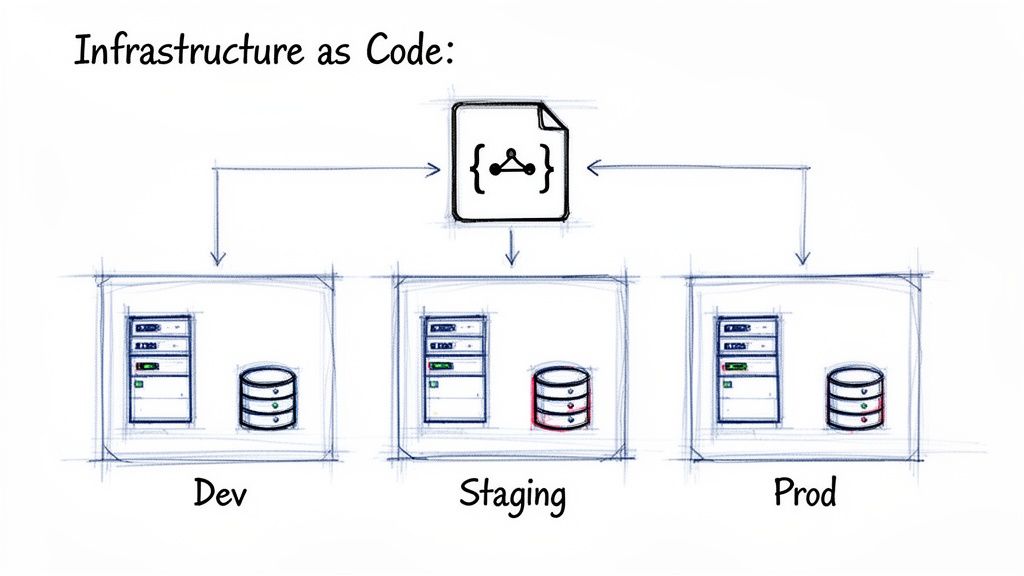
    Diagram showing a single code file defining consistent server and database infrastructure for Dev, Staging, and Prod environments.

    The "it works on my machine" problem is a notorious time-waster caused by inconsistencies between development, staging, and production environments. The solution is Infrastructure as Code (IaC).

    IaC is the practice of defining your entire infrastructure—servers, databases, load balancers, and networks—in version-controlled text files. Instead of manually configuring resources, you write a script that can build a perfectly identical environment every time. This script becomes your single source of truth, reviewed and tested just like your application code. It ensures your development, staging, and production environments are not just similar—they are identical.

    Eliminating "Configuration Drift" for Good

    Configuration drift occurs when manual, ad-hoc changes cause an environment to deviate from its intended state over time. These small tweaks accumulate, making the environment fragile and impossible to replicate.

    IaC eliminates drift by enforcing that all changes are made through code. To modify the infrastructure, you update the IaC script, get it peer-reviewed, and apply it automatically. This makes your environments disposable. If you encounter an issue, don't waste time debugging a live server; simply destroy it and provision a fresh, perfect copy from your code in minutes.

    Adopt Infrastructure as Code to transform infrastructure management from a manual, error-prone task into a predictable, automated engineering discipline. This is your guarantee that what you test is exactly what you deploy.

    Popular IaC Tools and Getting Started

    To get started with IaC, choose a tool that fits your team's stack and expertise. Here are the most popular options:

    • Terraform: An open-source tool from HashiCorp that is cloud-agnostic. Use it to manage infrastructure across AWS, Azure, and Google Cloud with a single declarative language.
    • AWS CloudFormation: The native IaC solution for AWS. Define your resources in YAML or JSON templates and let AWS handle the provisioning.
    • Ansible: A configuration management tool from Ansible that can also provision infrastructure. It is known for its simple, agentless architecture and human-readable YAML syntax.
    • Pulumi: Define infrastructure using general-purpose programming languages like Python, TypeScript, or Go. This is a great choice for teams that want to use familiar tools.

    To adopt IaC, start small. Select one component of your system, like a staging database, and define it using an IaC tool. Commit the code to version control and practice destroying and recreating it. This small win will demonstrate the power of the approach and build momentum.

    The Strategic Impact of IaC

    Adopting IaC is a significant step in maturing your deployment practices. By treating infrastructure like software, you make it version-controlled, automated, and reproducible. This is a critical enabler for CI/CD, as it drastically reduces the time needed to set up environments and guarantees consistency across your entire pipeline. The data shows that 78% of organizations have already adopted DevOps practices, and over 85% rely on cloud strategies where IaC is essential for scaling. You can learn more about how IaC is shaping modern deployments at configu.com.

    Implementing Quality Gates and Rollback Plans

    A fast deployment process is useless if it delivers broken code. To ensure stability, you must implement two critical safety nets: quality gates and rollback plans.

    A quality gate is a mandatory checkpoint in your deployment pipeline. It is a hard stop where specific, predefined criteria must be met before code can advance to the next stage. These are the non-negotiable rules that protect your production environment.

    What Makes a Strong Quality Gate

    Effective quality gates are automated and uncompromising. They are the guardians that prevent buggy code from reaching users. Implement these checks in your pipeline:

    • Automated Test Success: Require 100% pass rates for all unit, integration, and end-to-end tests. No exceptions.
    • Code Quality Scans: Integrate static analysis tools to check for code complexity, duplication, and adherence to style guides. Fail the build if standards are not met.
    • Security Vulnerability Scans: Use automated security tools (SAST/DAST) to scan for known vulnerabilities in your code and its dependencies. Block any release that introduces a critical security flaw.
    • Performance Thresholds: Run automated performance tests to ensure the new code does not degrade response times or increase resource consumption beyond acceptable limits.
    • Manual Approvals: For critical releases, configure your pipeline to require a manual sign-off from a QA lead or product manager directly within a tool like Jira.

    By automating these checkpoints, you codify your Definition of Done directly into your pipeline, ensuring every release meets the same high standard.

    Planning for Failure with Rollback Strategies

    Despite your best efforts, failures in production will happen. When they do, you need a reliable "undo" button. This is your rollback plan.

    A rollback plan is your acknowledgment that perfection is unattainable and your commitment to minimizing impact when issues arise. A tested rollback strategy is what turns a potential catastrophe into a minor, quickly resolved incident.

    Every deployment must have a clear, documented, and regularly tested procedure for reverting to the last known good state. Without one, you are simply hoping for the best—a failed strategy in software engineering.

    Automated Versus Manual Rollbacks

    Your rollback procedure should be as fast and safe as possible. Here are the two primary approaches:

    Rollback Type Description Actionable Advice
    Automated The CI/CD pipeline or a monitoring tool detects a critical failure (e.g., a spike in 500 errors) and automatically triggers a revert to the previous version. Implement this for Blue-Green or Canary deployments where a rollback is a simple traffic switch. Configure alerts to trigger the rollback automatically.
    Manual An on-call engineer follows a documented checklist to redeploy the previous stable version of the application. Use this for complex systems or database migrations. The checklist must be clear, concise, and tested regularly in a staging environment.

    The most critical action is to test your rollback procedure regularly. Run fire drills in a non-production environment to ensure the process works and your team knows exactly what to do. To streamline these approval and reversal steps, explore guides on what workflow automation is and how it can help to build more resilient processes.

    Putting It All Together: A Practical Jira Workflow for Software Deployment

    All these best practices come together in your daily workflow, and for most teams, the hub of that workflow is a Jira ticket. A well-configured Jira workflow transforms a simple task into a command center for your entire deployment process, making best practices a concrete and repeatable reality.

    Here is a step-by-step walkthrough of an automated, quality-driven deployment workflow managed in Jira.

    From Development to Staging

    The process starts when a developer moves a ticket to "In Progress" and creates a feature branch. When they push their first commit, automation kicks in:

    Your CI/CD pipeline is triggered instantly. It builds the code and runs all unit and integration tests. If any test fails, the pipeline stops and notifies the developer immediately, creating a tight feedback loop.

    Once all tests pass, the pipeline automatically deploys the feature to the staging environment. This triggers another automated action.

    Configure your CI tool to call the Jira API. The Jira ticket's status automatically changes from "In Progress" to "Ready for QA," and the ticket is assigned to the QA lead. This handoff happens without any manual intervention.

    The QA Approval Quality Gate

    Now the ticket is with the QA team, representing a critical quality gate. The QA engineer tests the feature in the staging environment, which is an identical clone of production thanks to Infrastructure as Code.

    The goal is to formally validate that the software is stable, meets all acceptance criteria listed in the Jira ticket, and is secure. To enforce this, build mandatory checks directly into your Jira workflow. For example, use an app like Harmonize Pro to add a structured checklist that must be completed before the ticket can be advanced.

    This makes your Definition of Done explicit and impossible to bypass. The ticket cannot move forward until every quality check is verified.

    Deploying to Production and Closing the Loop

    Once QA completes the final checklist item, another automation rule fires, preparing the ticket for its final journey to production.

    1. Approval for Production: The ticket transitions to "Ready for Release." This can trigger a notification to a product manager or release manager for final business-level approval.
    2. Production Deployment: With the final green light, the release engineer triggers the production deployment, using a Canary or Blue-Green strategy to ensure a safe rollout.
    3. Post-Deployment Monitoring: After deployment, the ticket moves to a "Monitoring" status while the team watches performance dashboards and logs to confirm stability.
    4. Done: Once the release is stable in production, the ticket is moved to "Done."

    The entire history of the deployment—from the first commit to the final release, including all automated checks and manual approvals—is now captured in a single Jira ticket. This is the power of effective Jira workflow automation: it connects your tools and teams into one unified, reliable system.

    Common Questions About Software Deployment

    Here are answers to common questions that arise as teams work to improve their deployment processes.

    What's the Single Most Important Practice for a Small Team?

    For a small team, the highest-impact action you can take is to set up a basic CI/CD pipeline.

    Automating your build and test process provides the biggest return on investment. It saves time, reduces human error, and creates a solid foundation that you can build upon as your team grows. Start here.

    How Should We Handle Database Migrations?

    Treat database migrations as first-class citizens of your deployment process, not afterthoughts.

    Follow these practical steps:

    • Version control everything. Store all migration scripts in your Git repository alongside your application code.
    • Design for failure. Write backward-compatible migrations. This ensures you can roll back your application code without breaking the database.
    • Test rigorously. Execute and validate every migration in a staging environment that is an exact replica of production before deploying.

    What’s the Real Difference Between Continuous Delivery and Continuous Deployment?

    The difference comes down to one final, manual approval step.

    Continuous Delivery means every change that passes all automated tests is automatically deployed to a production-like environment. A human must then manually trigger the final release to production.

    Continuous Deployment removes the manual step. If a change passes all automated gates, it is automatically released all the way to production without human intervention.

    Think of it this way: Continuous Delivery gets the release ready to go, but you still have to press the button. Continuous Deployment presses the button for you.


    Turn your software deployment best practices into automated, enforceable workflows with Harmonize Pro. See how our Jira app Nesty can build quality gates and automate handoffs to ensure flawless deployments every time. Learn more and get started.

  • A Practical Guide to Jira Workflow Automation

    A Practical Guide to Jira Workflow Automation

    Jira workflow automation is a method for building simple, rule-based logic into your projects to handle repetitive tasks. Use it to create a series of if-this-then-that instructions that automatically transition tickets, notify the right people, and update fields without manual intervention. This guide will show you how to apply this strategy to make your operations run smoothly as you scale.

    Why Jira Workflow Automation Is a Game Changer

    Two people observe a hand-drawn workflow board with several process columns and text.

    Manual Jira updates are a significant time sink. Projects often get bogged down by tedious updates, slow handoffs between teams, and simple human error. For example, a developer might push their code but forget to move the ticket into the "Ready for QA" column. As a result, the testing team remains unaware that a task is waiting, bringing the entire process to a halt.

    This is the exact problem Jira workflow automation solves. It transforms your static Jira board into a dynamic, self-managing system. Instead of relying on individuals to remember every step in a complex process, you build rules that execute these tasks automatically.

    Moving Beyond Manual Drudgery

    The primary value of automation is reclaiming your team's most valuable resource: time. By automating routine administrative tasks, you enable your engineers, QA analysts, and project managers to concentrate on high-impact work.

    Here are common problems that you can eliminate with automation:

    • Slow Handoffs: Tickets no longer sit idle waiting for a manual status or assignee change. Automate these transitions to ensure work flows continuously.
    • Inconsistent Data: Enforce required fields upon ticket creation or transition. This eliminates the need to chase down information and ensures your reports are built from complete data.
    • Constant Context Switching: Allow developers to stay focused on coding instead of frequently switching to Jira for ticket updates. Integrate your Git repository to update tickets automatically based on developer actions.
    • Missed Notifications: Set up rules to automatically notify key stakeholders at critical workflow stages, ensuring everyone stays informed.

    The goal is not just to accelerate tasks, but to build a reliable and predictable system that reduces the mental load on your team. When the process works seamlessly, your team can focus on solving problems and innovating.

    The Tangible Impact on Your Team

    Implementing Jira workflow automation provides immediate, measurable benefits. It is a core reason why Jira is a market leader, controlling over 42% of the project-tracking market. Its automation engine is the foundation for workflows used by millions daily, demonstrating its value as an essential feature.

    The results are clear: tickets are resolved faster, and project data becomes more accurate and reliable. For teams looking to implement more structured processes, our guide on getting started with Nesty provides actionable steps for creating nested checklists and advanced triggers.

    Understanding The Building Blocks Of An Automation Rule

    To effectively use Jira workflow automation, you need to understand its fundamental logic. Every automation, regardless of its complexity, is composed of three core components: Triggers, Conditions, and Actions.

    This structure operates like a simple command: a catalyst (Trigger) initiates the process, a set of qualifiers (Conditions) confirms it should proceed, and a task (Action) is executed. Mastering this sequence is key to building automations that genuinely assist your team.

    Here is a breakdown of these components:

    Component Purpose Actionable Examples
    Trigger The "If this happens…" event that starts the rule. Issue Created, Field Value Changed (e.g., Priority is updated), Issue Transitioned (e.g., moves from "To Do" to "In Progress"), Comment Added.
    Condition The "…only if this is true…" checkpoint. The rule stops if conditions are not met. Issue Type = Bug, Status = In Review, Assignee is empty, or a JQL query like priority = Highest AND "Story Points" > 8.
    Action The "…then do that" task performed by the rule. Transition Issue, Edit Issue (e.g., add a label), Send Slack/Teams notification, Create sub-tasks, Add a Nesty checklist.

    This Trigger → Condition → Action framework is the foundation for everything from sending a simple notification to orchestrating a complex, multi-step deployment process.

    Triggers: The Starting Gun

    A Trigger is the event that initiates an automation rule. Your rule remains dormant until its specified trigger event occurs.

    These events can range from a specific user action to a scheduled time, giving you precise control over when your automations execute.

    Here are common triggers to implement:

    • Issue Created: Use this for setup tasks. When a new issue is logged, automatically assign a default component or add a standard "Definition of Done" checklist.
    • Field Value Changed: This is highly practical. For instance, trigger a rule the moment the Priority field is changed to Highest to escalate visibility.
    • Issue Transitioned: Fire the rule when an issue moves between statuses, such as from ‘In Progress’ to ‘In Review’, to notify the next person in the chain.
    • Version Released: Use this trigger for cleanup. Build a rule to automatically find and close all tickets associated with a version upon its release.

    Selecting the correct trigger is the critical first step. An incorrect choice can cause your rule to execute too frequently, not at all, or at inconvenient times.

    Conditions: The Brains Of The Operation

    If the trigger starts the process, the Condition decides whether it should continue. It acts as an "…only if this is true" checkpoint. After a trigger fires, Jira evaluates the conditions you've set. The rule proceeds to the action only if all conditions pass. If any condition fails, the rule halts.

    This is how you add precision to your Jira workflow automation. Conditions prevent your rules from running on every issue, allowing you to target very specific scenarios.

    A common mistake is building rules with only a trigger and an action. Conditions provide the necessary control, preventing a rule designed for bug reports from incorrectly running on new feature stories.

    Base your conditions on any data point within an issue. For example, use a JQL (Jira Query Language) condition to check if issueType = Bug AND priority = High. Alternatively, use a simpler field condition to check if the ‘Assignee’ field is empty. For advanced use cases, you can even check for a specific change in assignee to initiate a series of other checks.

    Actions: The Workhorse

    The final component is the Action—the "then do that" part of the rule. Once the trigger fires and all conditions are met, the action is the task the rule performs. This is the workhorse of your automation, executing repetitive tasks so your team doesn't have to.

    The range of available actions is extensive, covering everything from modifying the issue itself to communicating with external tools.

    Here are a few practical actions you can configure:

    • Transition Issue: Automatically move an issue to the next status in your workflow.
    • Edit Issue: Modify a field's value, such as setting a due date or adding a label.
    • Send a Notification: Ping a user, group, or channel in Slack or Microsoft Teams.
    • Create Sub-tasks: Instantly break down a larger story into predefined sub-tasks and assign them to the appropriate team members.

    By combining Triggers, Conditions, and Actions, you can construct powerful automations tailored to your team's specific workflow.

    Practical Automation Recipes You Can Use Today

    Understanding the theory of Jira workflow automation is useful, but applying it delivers tangible results. This section provides battle-tested automation recipes you can implement immediately to eliminate common bottlenecks and manual work.

    Flowchart illustrating the three steps of a Jira automation rule: trigger, condition, and action.

    Every automation rule follows a Trigger → Condition → Action sequence. Once you internalize this logic, you can analyze any manual process and break it down into an automatable workflow.

    Automatically Assign Bugs to the Right QA Lead

    A common bottleneck is bug triage, where new bugs sit in the backlog awaiting assignment. This recipe routes new bugs directly to the appropriate QA lead, preventing delays.

    Implement it with this configuration:

    • Trigger: Issue Created
    • Condition: Issue Type = Bug AND Component is not empty
    • Action: Use an If/else block to route the issue based on its component.
      • If: Component = "API"Action: Assign issue to Jane Doe
      • If: Component = "UI/UX"Action: Assign issue to John Smith
      • If: Component = "Database"Action: Assign issue to Emily Rogers

    With this rule active, bugs are immediately assigned upon creation, eliminating manual handoffs and ensuring they enter the QA queue without delay.

    Move a Task to “In Review” When a Pull Request is Opened

    Developers often face context switching when they finish coding, open a pull request, and then must remember to update the corresponding Jira ticket. This automation eliminates that manual step, keeping Jira synchronized with your development work.

    To set this up, ensure Jira is connected to your Git provider (e.g., GitHub or Bitbucket).

    • Trigger: Pull Request Created
    • Condition: (Optional but recommended) Status = "In Progress". This prevents the rule from moving a ticket backward in the workflow.
    • Action: Transition issue to "In Review"

    This rule provides immediate visibility to the entire team. Product managers can see what is ready for review, and QA can prepare test cases without waiting for a developer's status update.

    The key benefit is that Jira begins to reflect the actual state of work, rather than being an additional task for developers. The workflow follows the work, not the other way around.

    Auto-Close Stale Tickets and Keep Your Backlog Clean

    Backlogs often become cluttered with old, irrelevant tickets. This recipe functions as a digital janitor, automatically closing issues that have been inactive for an extended period.

    • Trigger: Scheduled (configure it to run daily or weekly).
    • Condition: Use a JQL query like Status = "Awaiting Customer Feedback" AND Updated < -90d to target issues untouched for 90 days.
    • Action: First, Add a comment such as, "Closing this due to inactivity. Please feel free to reopen it if the problem persists." Then, Transition issue to "Closed".

    This practice keeps your team focused on active work and improves the accuracy of your reporting by removing obsolete items from the backlog. Automating such tasks is a key driver behind the global workflow automation market's projected growth to over $45 billion. Industry reports indicate that smart automation can cut triage time by 30-60%, freeing up significant team capacity.

    Sync Parent Task Status with Its Sub-Tasks

    A parent story should not remain "In Progress" when all its sub-tasks are complete. This automation ensures the parent issue's status accurately reflects the state of its underlying work.

    • Trigger: Issue Transitioned (fires when any sub-task changes status).
    • Condition: First, verify that the triggering issue is a sub-task.
    • Action: Use the Branch rule / related issues option.
      • Branch for: Parent
      • Condition (on the parent): Add a condition to verify that all other sub-tasks of the parent are also in the "Done" status.
      • Action (on the parent): Transition issue to "Done"

    This creates a self-managing work hierarchy, which is particularly useful for complex features with numerous sub-tasks. For teams requiring even more structure, our pre-built Nesty templates offer advanced capabilities. Learn how to add nested checklists and quality gates to enforce your Definition of Done in our guide to Nesty developer workflows.

    These recipes are a starting point. By creatively combining Triggers, Conditions, and Actions, you can configure Jira to match your team's real-world processes, saving time and building a more reliable system.

    Advanced Techniques for Complex Workflows

    Once you master the basics, you can begin automating more complex processes in Jira. Moving beyond simple trigger-action recipes allows you to tackle your team's most nuanced workflows. These advanced techniques transform your rules from simple helpers into the operational core of your project.

    Use these methods to build automations that reflect your team's unique processes, making the system adapt to your workflow rather than forcing your workflow to fit the tool.

    Handling Multiple Scenarios with Branching Logic

    A standard automation rule follows a linear path. However, real-world workflows often have a single trigger that can lead to multiple outcomes. Use branch rules to manage these scenarios effectively.

    Branching allows you to create multiple "if-this-then-that" paths within a single rule. Instead of building five separate automations for the same trigger, you can create one master rule that intelligently routes the work.

    For example, when a developer merges a pull request, the next step can vary:

    • A bug fix might need to go to "Ready for Regression Testing."
    • A new feature should move to "Ready for UAT."
    • A small tech debt story can go straight to "Done."

    A branch rule handles this by using the Pull Request Merged trigger and then branching based on the issueType to transition the issue to the correct status. This approach keeps your automation logic clean, organized, and easier to manage than multiple overlapping rules.

    The primary advantage of branching is consolidation. You create a single source of truth for a key workflow step, which simplifies debugging and future updates.

    Making Your Automations Dynamic with Smart Values

    Static actions have limitations; you cannot hard-code every possible assignee or comment for every scenario. Smart Values solve this by letting you pull dynamic information from your issues and inject it directly into your automation actions.

    Smart Values are placeholders, like {{issue.summary}} or {{reporter.displayName}}, that Jira replaces with real-time data when the rule executes. They add context and personalization to your automations.

    Here are ways to use them immediately:

    • Personalized Notifications: Instead of a generic message, send a Slack notification like: "Hey {{assignee.displayName}}, the priority on '{{issue.summary}}' was just raised to Highest by {{initiator.displayName}}."
    • Dynamic Comments: When escalating an issue, automatically add a comment that tags relevant stakeholders and provides context: @"squad.lead", the due date for this issue was just changed to {{issue.duedate}}. Please review.
    • Copying Field Data: Sync information between related issues. When creating sub-tasks, use Smart Values to automatically copy the parent issue's Fix Version and Component fields to the new sub-tasks.

    Using Smart Values makes your automations more informative and feel less robotic, acting more like a helpful team member who provides the right information at the right time.

    Running Automations on a Schedule

    Not all automations should be triggered by a user action. Some of the most effective rules run in the background, maintaining project hygiene and data accuracy. For these time-based processes, use scheduled rules.

    Set these rules to run at a specific interval—such as daily or weekly. The rule then executes a JQL query to find a batch of issues meeting your criteria and performs an action on them.

    This is ideal for housekeeping tasks:

    • Find Stale Issues: Create a daily rule to find all issues that have not been updated in 30 days and add a comment requesting a status update.
    • Identify Blocked Work: Set up a rule to run each morning that identifies high-priority issues with the "Blocked" flag and sends a summary to a project manager's Slack channel.
    • Enforce SLAs: For support teams, a scheduled rule can run hourly to find tickets approaching their SLA breach time and automatically escalate their priority.

    Scheduled rules help you proactively manage your workflow instead of constantly reacting to problems after they have already caused delays.

    Integrating with External Tools Using Webhooks

    Your workflow often extends beyond Jira, connecting to code repositories, CI/CD pipelines, and communication platforms. Webhooks enable your Jira automation to interact with these external systems.

    A webhook is an automated message sent from Jira to another application when a specific event occurs. Configure an action in your automation rule to "Send web request." When the rule runs, Jira sends an HTTP POST request with relevant issue data (in JSON format) to a URL you provide.

    This enables deep, cross-tool integration. For instance, a development team can link Jira to their CI/CD pipeline:

    1. Trigger: An issue is transitioned to "Ready for Deployment."
    2. Action: A webhook is sent to a tool like Jenkins or GitHub Actions.
    3. Result: The external tool receives the webhook, reads the issue key from the JSON payload, and automatically initiates the correct deployment script.

    This creates a seamless flow from development to production, orchestrated entirely by your Jira workflow. By combining these advanced techniques—branching, Smart Values, scheduled rules, and webhooks—you can build an intelligent system that automates even your most intricate processes.

    How to Manage Automation Rules Without Creating Chaos

    Hand-drawn diagrams illustrating the contrast between chaotic naming and structured governance and audit workflows.

    As your team adopts automation, it's easy for rules to become a tangled, undocumented mess, leading to conflicts, silent failures, and maintenance challenges. This "rule sprawl" is a common problem that arises without a clear governance plan.

    To prevent this, establish a simple governance framework. These guidelines will help keep your Jira workflow automation scalable, transparent, and manageable as your team grows.

    Establish Clear Naming Conventions

    The first step is to enforce a consistent naming convention for every rule. A vague name like "Update Ticket" creates future confusion. In contrast, a name like [DEV] → [QA] | Transition to In Review on PR Creation clearly communicates the rule's purpose, scope, and trigger.

    A robust naming structure should include:

    • Scope or Team: Identify the relevant team, such as [Marketing], [DevOps], or [Support].
    • Trigger Event: Use clear terms like On PR Merge or On Bug Creation.
    • Primary Action: Describe the main task, such as Assign to QA Lead or Close Stale Ticket.

    This discipline makes your automation library easy to scan and is invaluable for debugging or locating a specific rule.

    Use Labels to Organize and Filter Rules

    Jira allows you to add labels to your automation rules. Use this feature to group related automations, effectively creating folders that let you filter your list and find what you need quickly.

    Think of labels as an organizational toolkit. Create labels like notifications, ci-cd, triage, or housekeeping. This enables you to instantly view all rules related to a specific function, regardless of their project.

    This is highly effective for auditing. If you suspect an issue with your notification system, filter by the notifications label to review all relevant rules at once, instead of searching through a long, unsorted list.

    Define Ownership and Monitor Usage

    Not all rules are equal. Enterprise governance often requires a tiered approach. Allow team leads to manage project-specific rules, but assign a designated owner or a small governance team to any global rules that affect multiple projects.

    This is crucial because automation is a finite resource. Atlassian plans have execution limits, and exceeding them can throttle your instance or incur extra costs. Central ownership for global rules helps prevent redundant or inefficient automations from consuming your monthly quota. For further reading, there are excellent governance models for Jira on dev.to available.

    Make it a practice to regularly review the audit log for failures and monitor your usage statistics. If a single rule is responsible for 40% of your monthly executions, investigate whether it can be optimized. Proactive monitoring ensures your system remains healthy and performant, supporting your organization's growth.

    Frequently Asked Questions About Jira Automation

    As you implement Jira workflow automation, you will likely encounter specific challenges. Here are answers to some of the most common questions from teams getting started.

    Can Automation Rules Run in a Specific Order?

    A frequent question is whether you can force an execution order when multiple rules share the same trigger.

    The short answer is no. Jira processes rules triggered by the same event asynchronously, so you cannot guarantee their execution order.

    The best practice is to consolidate the logic into a single, smarter rule. Instead of creating three separate rules, build one master rule that uses branching logic (e.g., if/else blocks) to handle the different conditions. This approach makes the execution path predictable and simplifies debugging.

    How Do I Test an Automation Rule Without Affecting Live Data?

    To avoid accidentally impacting your production project, test your automation rules in a safe environment.

    The recommended method is to create a dedicated "sandbox" project. Clone your main project’s workflow and settings to create a safe space where you can build and refine rules using test issues.

    Another practical tip is to add a temporary condition to your rule, such as creator = currentUser(). This ensures the rule will only run on issues you create. Once you have confirmed it works correctly, remove the condition to deploy it.

    Pro-Tip: Use a "manual trigger" for testing. Configure the rule to fire only when you click a specific button on an issue. This gives you complete control over when and where the automation runs during the testing phase.

    What’s the Difference Between Project and Global Rules?

    Understanding this distinction is key to keeping your Jira instance organized.

    • Project Rules: These are created within a specific project and can only affect issues in that project. They are ideal for team-specific processes and can be managed by project administrators.

    • Global Rules: These are configured by a Jira administrator and can run across multiple projects or your entire Jira site. Use them to standardize processes everywhere, such as ensuring every "Bug" issue created in any project receives a specific label.

    Knowing when to use each type helps prevent "rule sprawl" and keeps your automations manageable as your organization scales.


    Ready to go beyond basic automation and build truly intelligent, structured workflows? Harmonize Pro's flagship app, Nesty, transforms your Jira issues with unlimited nested checklists, quality gates, and smart triggers to automate complex handoffs for Dev→QA, deployments, and onboarding.

    Learn how Nesty can enforce your Definition of Done and finally put an end to all that manual busywork.

    Article created using Outrank